Kids CraftsNo. 1386 · The 2026 edition
"Doll Face" Halloween Photo Tutorial
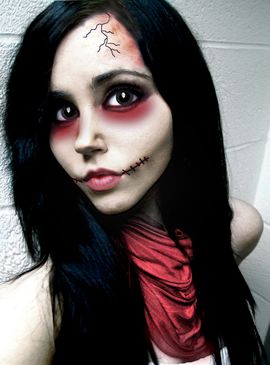
Transform your photo into a creepy doll face with this easy photo editing tutorial!
Our own summary of the original — the full post and photos live at instructables.com.

This tutorial shows how to create a haunting doll-like appearance using photo editing software. Start with a melancholic portrait, then whiten the skin and use Liquify for a gaunt look. Optionally, add cracked textures for an eerie broken doll effect.
Directions
- Start with a sad or melancholic photo of yourself.
- Add a new layer and use a soft white brush to paint over all exposed skin. Change the layer blend mode to Hue and adjust the opacity if needed.
- Go to Filter > Liquify and reshape your facial features to make them look thinner and more gaunt.
- Search online for a cracked texture image and save it.
- Copy and paste the cracked image onto your photo, positioning it over the face and skin areas.
- Set the cracked layer's blend mode to Multiply and lower its opacity to 75%.
- Use an eraser tool to remove cracks from areas where you don't want them, like eyes or lips.
More photos


Photos hosted by instructables.com.